Javadoc with Lombok on Java 25, powered by Groovy scripts and AI skills
How to generate complete Javadoc with recent versions of Lombok on Java 25, using Groovy scripts and AI skills


Eleven years. Eleven years of Lombok in every Java project I have touched. Eleven years of @Builder, @Getter, @EqualsAndHashCode without ever writing a single line of boilerplate. Eleven years of bliss - until the day I tried to generate 100% clean Javadoc on a Java 25 project with a recent version of Lombok.
The diagnosis: empty Javadoc. Phantom builders. Missing constructors. A Maven plugin complaining about everything while solving nothing.
The problem is fundamental: Lombok is an annotation processor that modifies the AST (Abstract Syntax Tree) of the Java compiler during compilation. The final bytecode does contain the generated methods, but the source code remains unchanged. And javadoc reads source code, not bytecode. Your @Builder, @UtilityClass, and other annotations vanish into that gap - and with them, all the carefully written documentation on your fields.
Until now, I had been settling for approximate Javadoc. No more approximations.
I searched. ChatGPT suggested Lombok versions incompatible with Java 25. GitHub Copilot gave me plugin configurations that do not exist. Stack Overflow shows answers from the Java 8 era. I had to go old-school: think, test, fix, repeat. All without Generative AI.
The solution I built goes through a delombok phase (generating source code rather than bytecode), a precise Maven configuration for Java 25, a dedicated profile to avoid breaking IDEs, Groovy scripts to inject missing Javadoc into Lombok-generated classes, and as a bonus, two skills so you do not have to walk this path yourself.
It is not simple. But it works.
Lombok: the library I love
Lombok is great: it reduces boilerplate by automatically generating getters, setters, constructors, builders, wrapped exceptions, and more. I already wrote about it in my Lombok article. It is a proven time-saver and readability booster.
I have used it in every Java project for over 11 years - it was version 1.12.x back then, in 2013. It works just as well with Spring Boot as with Quarkus, and plays nicely with all Apache Commons libraries.
A small digression that only reflects my own opinion: I genuinely cannot understand developers, tech leads, and architects who resist Lombok with arguments like “we do not know what it does” or “it’s for lazy people.” Among Spring Boot developers, who really knows what
@Transactional,@GetMapping,@Component, or aJpaRepositoryinterface actually does under the hood? These Spring annotations do not generate bytecode at compile time: they work through dynamic proxies at runtime (Spring AOP, CGLIB) or are read reflectively by the framework. The mechanism is fundamentally different from Lombok, which is an annotation processor that modifies the compiler’s AST to generate real code in the compiled class. Two different worlds, but in both cases, magic happens under the hood. Why would Lombok be wrong while the rest is acceptable? I have heard here and there that Lombok causes problems during refactoring. I have done plenty of refactorings, and Lombok was never the main problem - far from it. End of digression, you are free to disagree.
What is the actual problem?
Lombok is an annotation processor that modifies the compiler’s AST: that is precisely where Javadoc generation breaks down.
Javadoc is generated from source code, not from the bytecode produced by the compiler. The source code does not contain the methods generated by Lombok, so Lombok annotations are simply not taken into account by the javadoc tool.
If you landed on this page, it is probably not by accident - you have likely already discovered this yourself.
If it were only getters and setters, you could live without documenting them. But for constructors, builders, and other generated constructs, the problem is more serious. For instance, a builder loses all of its documentation - or even its very existence - since it does not appear in the Javadoc at all, even though it may be the only way to construct an instance of the class.
And that is not acceptable: documentation is an essential part of the codebase, and it must be complete and up to date.
This is not only a matter of human convenience. Today, AIs read your Javadoc. Without complete documentation, they have to guess behavior from source code - and guessing, for an AI, means risking hallucination. Well-written Javadoc with examples lets them instantly understand the contract of a class or method. Writing documentation is also coding for the machines that code.
The demo project
Starting point: a standard Maven project on Java 25, with a few classes annotated with Lombok.
For this example I will use the following annotations: the classic @Getter, @Setter, @EqualsHashCode, @ToString, @Builder to generate a builder, and @UtilityClass to generate a utility class (private constructor, static methods, final class) as commonly found in real-world projects.
Here is the project structure, also available on GitHub:
$ exa --tree
.
├── pom.xml
├── README.md
└── src
   └── main
      └── java
         └── fr
            └── fxjavadevblog
               └── mvnlmbkjdoc
                  ├── garage
                  │  ├── Garage.java
                  │  └── package-info.java
                  └── vehicules
                     ├── Energy.java
                     ├── package-info.java
                     ├── Vehicule.java
                     └── VehiculeUtils.java
The interesting classes here are Garage and Vehicule, both annotated with Lombok.
Javadoc best practices
Writing good Javadoc is like writing good code: it requires discipline and clarity.
- Strong opening sentence: “Represents a vehicle…”, “Manages a collection of…”. Never “This class allows…”. Go straight to the point. This sentence is what appears in all indexes.
- Systematic tags: every method must have its
@param,@return,@throws. Yes, even forNullPointerException- especially forNullPointerException. - Concrete examples: an
@apiNotewith a<pre>{@code ...}</pre>block showing real usage. Without this, an AI will have to guess. And guessing for an AI means making things up.
Without these elements, your Javadoc will be incomplete, and your code less understandable - for humans and machines alike.
Lombok specifics
Lombok simplifies code, but imposes specific rules for documentation:
1. Document on the field, not on the method
With Lombok, the field Javadoc is automatically copied to generated getters and setters - since v1.12.0.
- A
@returnon a@Getterfield lands on the getter - A
@paramon a@Setterfield goes to the setter
2. The builder special case
Bad news: IDEs will not display field Javadoc inside the builder (see Lombok bug #2481).
The solution: a class-level @apiNote with a complete construction example:
@apiNote
Build instances via the fluent builder:
<pre>{@code
Vehicule v = Vehicule.builder()
    .registrationNumber("AB-123-CD")
    .brand("Renault")
    .build();
}</pre>
3. Different descriptions for getter/setter?
Use the -- GETTER -- and -- SETTER -- sections to differentiate behavior.
Yes, it is a bit more to write. But clarity has a price. And clarity, that price is worth paying.
Garage.java
package fr.fxjavadevblog.mvnlmbkjdoc.garage;

import java.util.Collections;
import java.util.LinkedHashSet;
import java.util.Set;

import fr.fxjavadevblog.mvnlmbkjdoc.vehicules.Vehicule;
import lombok.Builder;
import lombok.ToString;

@ToString
@Builder
public class Garage {

    private final Set<Vehicule> vehicules = new LinkedHashSet<>();

    public void addVehicule(Vehicule vehicule) {
        vehicules.add(vehicule);
    }

    public void removeVehicule(Vehicule vehicule) {
        vehicules.remove(vehicule);
    }

    public Set<Vehicule> getVehicules() {
        return Collections.unmodifiableSet(vehicules);
    }

}
Vehicule.java
package fr.fxjavadevblog.mvnlmbkjdoc.vehicules;

import java.io.Serializable;
import java.time.LocalDate;

import lombok.Builder;
import lombok.EqualsAndHashCode;
import lombok.Getter;
import lombok.ToString;

@Builder
@EqualsAndHashCode(of = "registrationNumber")
@ToString
public class Vehicule implements Serializable {

    @Getter
    private final String registrationNumber;

    @Getter
    private final LocalDate registrationDate;

    @Getter
    private final String brand;

    @Getter
    private final Energy energy;
}
VehiculeUtils.java
package fr.fxjavadevblog.mvnlmbkjdoc.vehicules;

import lombok.experimental.UtilityClass;

@UtilityClass
public class VehiculeUtils {

    private static final String FORMAT_STRING = "Registration number: %s, Brand: %s, Energy: %s";

    public String format(Vehicule vehicule) {
        return FORMAT_STRING.formatted(vehicule.getRegistrationNumber(),
            vehicule.getBrand(),
            vehicule.getEnergy());
    }

}
Energy.java
package fr.fxjavadevblog.mvnlmbkjdoc.vehicules;

public enum Energy {

    ELECTRIC,

    GASOLINE,

    DIESEL,

    HYBRID,

    HYDROGEN
}
Adding Javadoc generation
To generate Javadoc, you use the maven-javadoc-plugin with the javadoc:javadoc goal. This plugin is part of Maven’s default plugins, so you do not need to add it to pom.xml unless you want to configure it precisely.
$ mvn clean compile javadoc:javadoc
[INFO] --- javadoc:3.12.0:javadoc (default-cli) @ mvn-lombok-javadoc ---
[INFO] No previous run data found, generating javadoc.
[WARNING] Javadoc Warnings
[WARNING] ./src/main/java/fr/fxjavadevblog/mvnlmbkjdoc/garage/Garage.java:20: warning: use of default constructor, which does not provide a comment
[WARNING] public class Garage {
[WARNING] ^
[WARNING] ./src/main/java/fr/fxjavadevblog/mvnlmbkjdoc/vehicules/Vehicule.java:21: warning: use of default constructor, which does not provide a comment
[WARNING] public class Vehicule implements Serializable {
[WARNING] ^
[WARNING] 2 warnings
Note: as a reminder, if a class has no constructor, Java generates a default one with default visibility and no arguments.
First observation: 2 warnings appear during Javadoc generation.
The warnings indicate that the default constructors are not documented because, from the Javadoc tool’s point of view, they exist. But they do not actually exist in the final code: the @Builder annotation makes the default constructor private - yet the maven-javadoc-plugin ignores that, because the source code was never modified by Lombok.
This clearly demonstrates that Javadoc generation is corrupted when Lombok annotations are not taken into account.
The solution: delombok to the rescue
Why delombok?
The idea is to use delombok: a tool provided by Lombok itself that does the reverse operation. Where Lombok reduces source code to annotations, delombok expands those annotations into ordinary Java code, with no dependency on Lombok.
This expanded code is then fed to maven-javadoc-plugin as the source to document. As a result, Javadoc sees the constructors, builders, utility methods that were generated, and everything is properly documented.
There is a dedicated Maven plugin for this: lombok-maven-plugin. Its version (1.18.20.0) is old, but it can be configured to use any version of Lombok as a dependency - which is exactly what makes it compatible with Java 25.
Adding the delombok plugin
Here is the plugin configuration to add to the <build><plugins> section of your pom.xml.
Two key points: first, <addOutputDirectory>false</addOutputDirectory> - the delomboked code must not be added to the compilation source roots, only served to Javadoc. Second, the <dependencies> section forces the Lombok version used by the plugin to match the one used by the project, ensuring Java 25 compatibility.
This is the first “trick” - that
<dependencies>section, buried deep in the plugin’s FAQ. Without it, you get errors related to the Lombok version being used.
pom.xml
<properties>
    <maven.compiler.source>25</maven.compiler.source>
    <maven.compiler.target>25</maven.compiler.target>
    <project.build.sourceEncoding>UTF-8</project.build.sourceEncoding>
    <lombok.version>1.18.46</lombok.version>
</properties>

<dependencies>
    <dependency>
        <groupId>org.projectlombok</groupId>
        <artifactId>lombok</artifactId>
        <version>${lombok.version}</version>
        <scope>provided</scope>
    </dependency>
</dependencies>

<build>
    <plugins>
        <plugin>
            <groupId>org.apache.maven.plugins</groupId>
            <artifactId>maven-compiler-plugin</artifactId>
            <version>3.14.0</version>
            <configuration>
                <annotationProcessorPaths>
                    <path>
                        <groupId>org.projectlombok</groupId>
                        <artifactId>lombok</artifactId>
                        <version>${lombok.version}</version>
                    </path>
                </annotationProcessorPaths>
            </configuration>
        </plugin>
    </plugins>
</build>

<profiles>
    <profile>
        <id>javadoc</id>
        <build>
            <plugins>
                <plugin>
                    <groupId>org.projectlombok</groupId>
                    <artifactId>lombok-maven-plugin</artifactId>
                    <version>1.18.20.0</version>
                    <executions>
                        <execution>
                            <id>delombok</id>
                            <phase>generate-sources</phase>
                            <goals>
                                <goal>delombok</goal>
                            </goals>
                            <configuration>
                                <addOutputDirectory>false</addOutputDirectory>
                                <sourceDirectory>src/main/java</sourceDirectory>
                                <verbose>true</verbose>
                            </configuration>
                        </execution>
                    </executions>
                    <dependencies>
                        <dependency>
                            <groupId>org.projectlombok</groupId>
                            <artifactId>lombok</artifactId>
                            <version>${lombok.version}</version>
                        </dependency>
                    </dependencies>
                </plugin>
                <plugin>
                    <groupId>org.apache.maven.plugins</groupId>
                    <artifactId>maven-javadoc-plugin</artifactId>
                    <version>3.12.0</version>
                    <configuration>
                        <sourcepath>${project.build.directory}/generated-sources/delombok</sourcepath>
                        <!-- Suppress "missing" doclint category for Lombok-generated methods
                             (builder setter @param and build() comment are not controllable from source) -->
                        <doclint>all,-missing</doclint>
                        <additionalOptions>
                            <additionalOption>-tag "apiNote:a:API Note:"</additionalOption>
                            <additionalOption>-tag "implSpec:a:Implementation Requirements:"</additionalOption>
                            <additionalOption>-tag "implNote:a:Implementation Note:"</additionalOption>
                        </additionalOptions>
                    </configuration>
                </plugin>
            </plugins>
        </build>
    </profile>
</profiles>
The IDE side effect
At this point you might think the job is done. But no.
If you add the plugin directly in the main <build> section, lombok-maven-plugin runs on every Maven compilation, including when your IDE reloads the project.
The IDE (IntelliJ, VSCode with the Java extension, Eclipse) detects the target/generated-sources/delombok/ directory and adds it to its source roots. It then has two versions of every class: the original Lombok-annotated version in src/main/java/, and the expanded version in target/generated-sources/delombok/. Result: compilation errors in the IDE, while the Maven build runs perfectly.
The plugin configuration must therefore be isolated so it only activates when needed: during Javadoc generation.
What is my best profile?
The clean solution is a dedicated Maven profile. You put everything related to Javadoc generation there, and activate it only explicitly.
Final result
$ mvn clean compile javadoc:javadoc -Pjavadoc
[INFO] --- lombok-maven-plugin:1.18.20.0:delombok (delombok) @ mvn-lombok-javadoc ---
[INFO] Delombok complete.
[INFO] --- maven-javadoc-plugin:3.12.0:javadoc (default-cli) @ mvn-lombok-javadoc ---
[INFO] No previous run data found, generating javadoc.
[INFO] BUILD SUCCESS
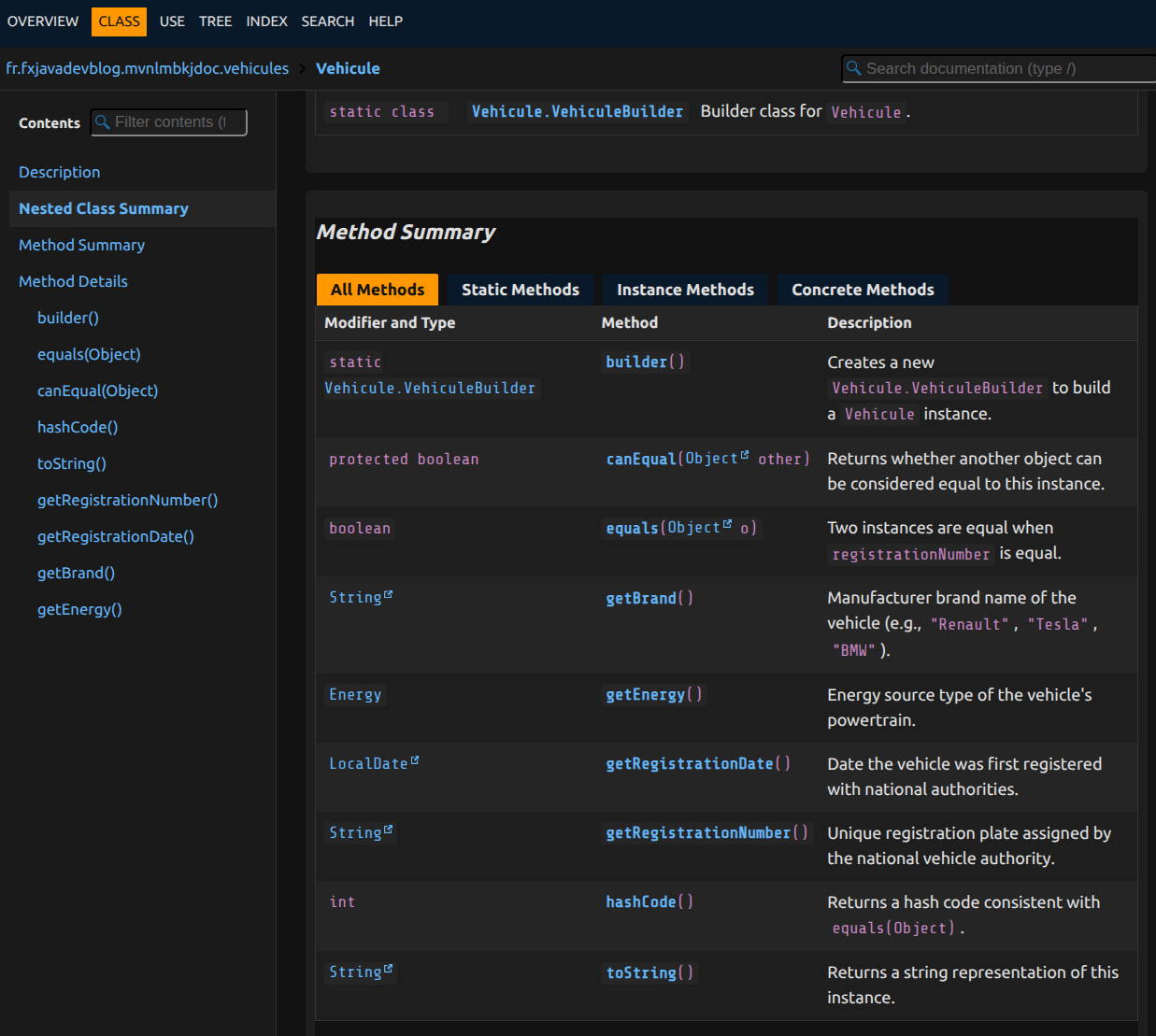
The generated Javadoc now includes the private constructors, builder methods, and utility methods generated by @UtilityClass.
In addition, thanks to Lombok since version v1.12.0, the field Javadoc is automatically copied to generated getters and builder methods. For example, the Javadoc on the registrationNumber field is copied to the generated getter and to the registrationNumber() builder method. Lombok even automatically adds @return {@code this}. to builder methods.
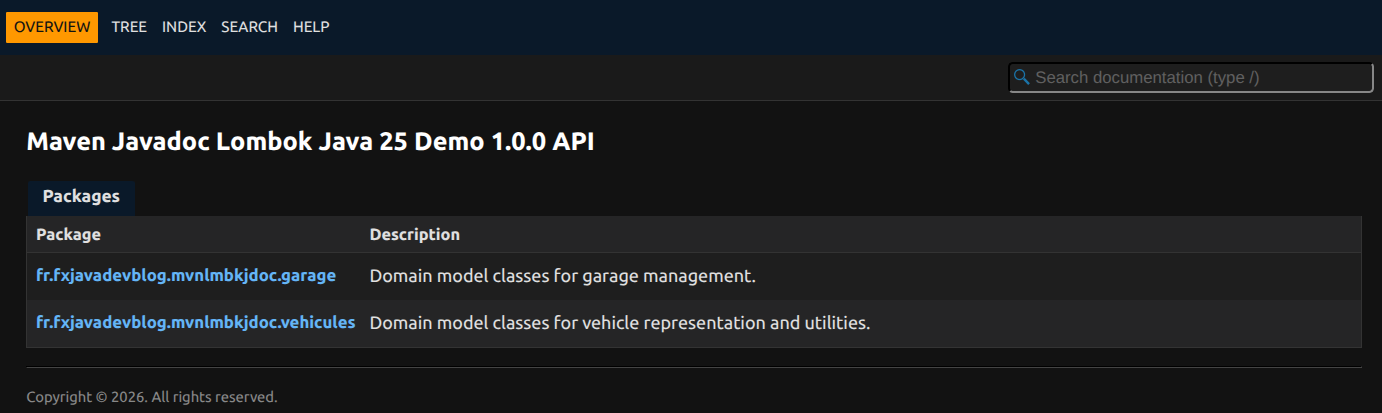
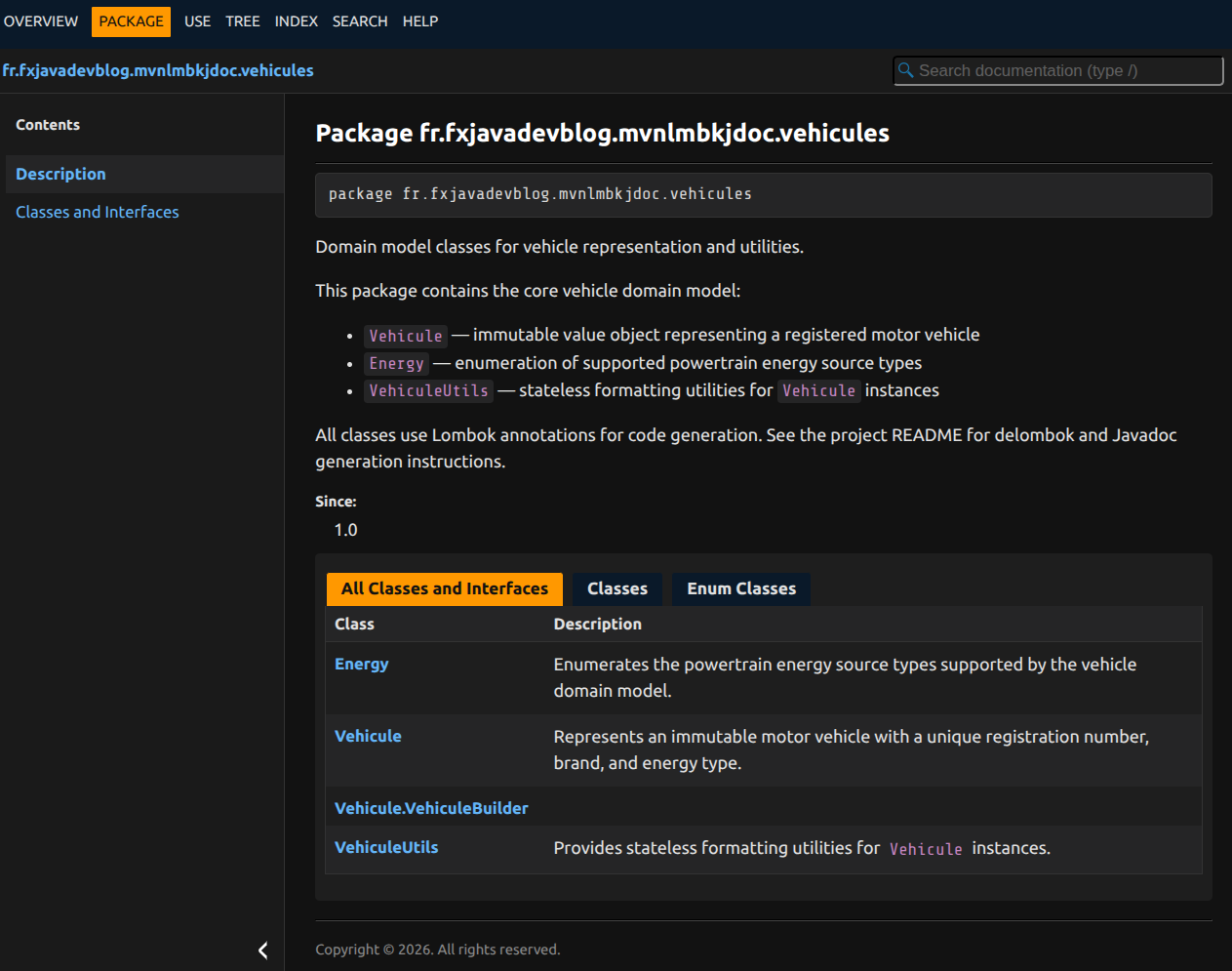
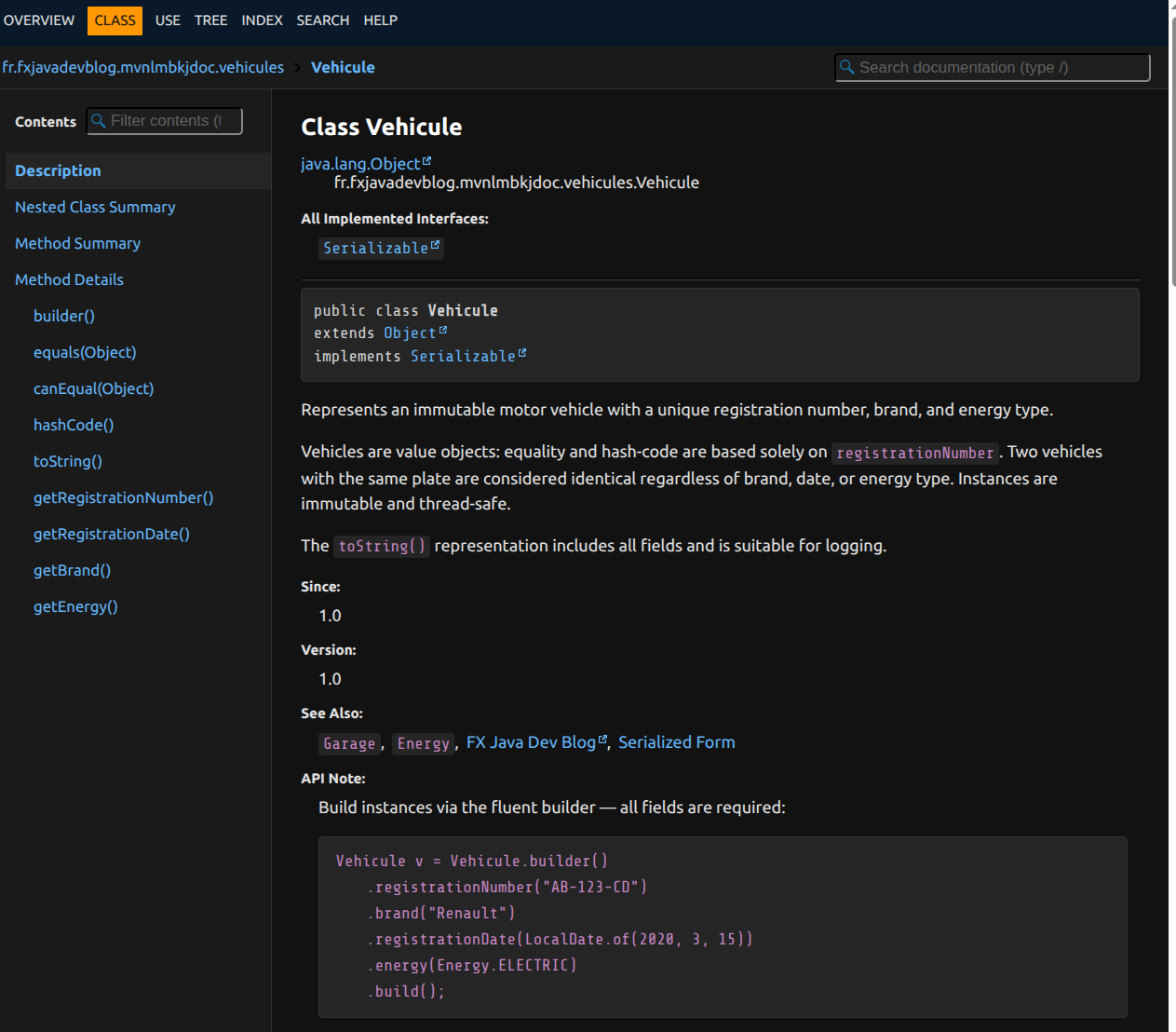
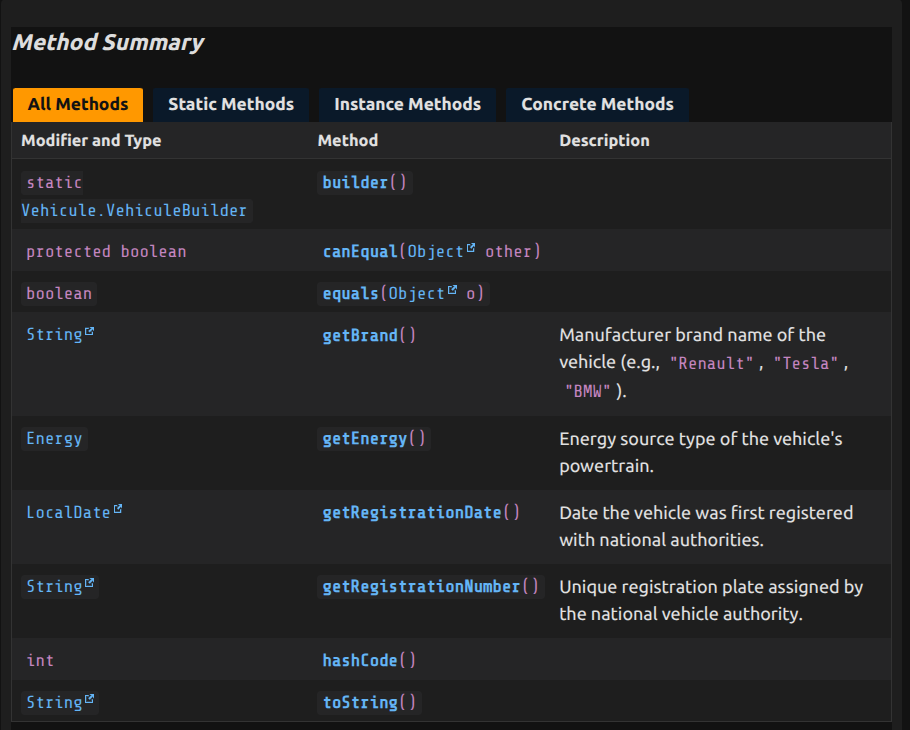
If you like this dark theme for Javadoc, you can grab it directly from the demo project ;-)
You can also use custom sections with -- GETTER -- to define specific Javadoc for the generated getter.
Groovy to generate the remaining Javadoc
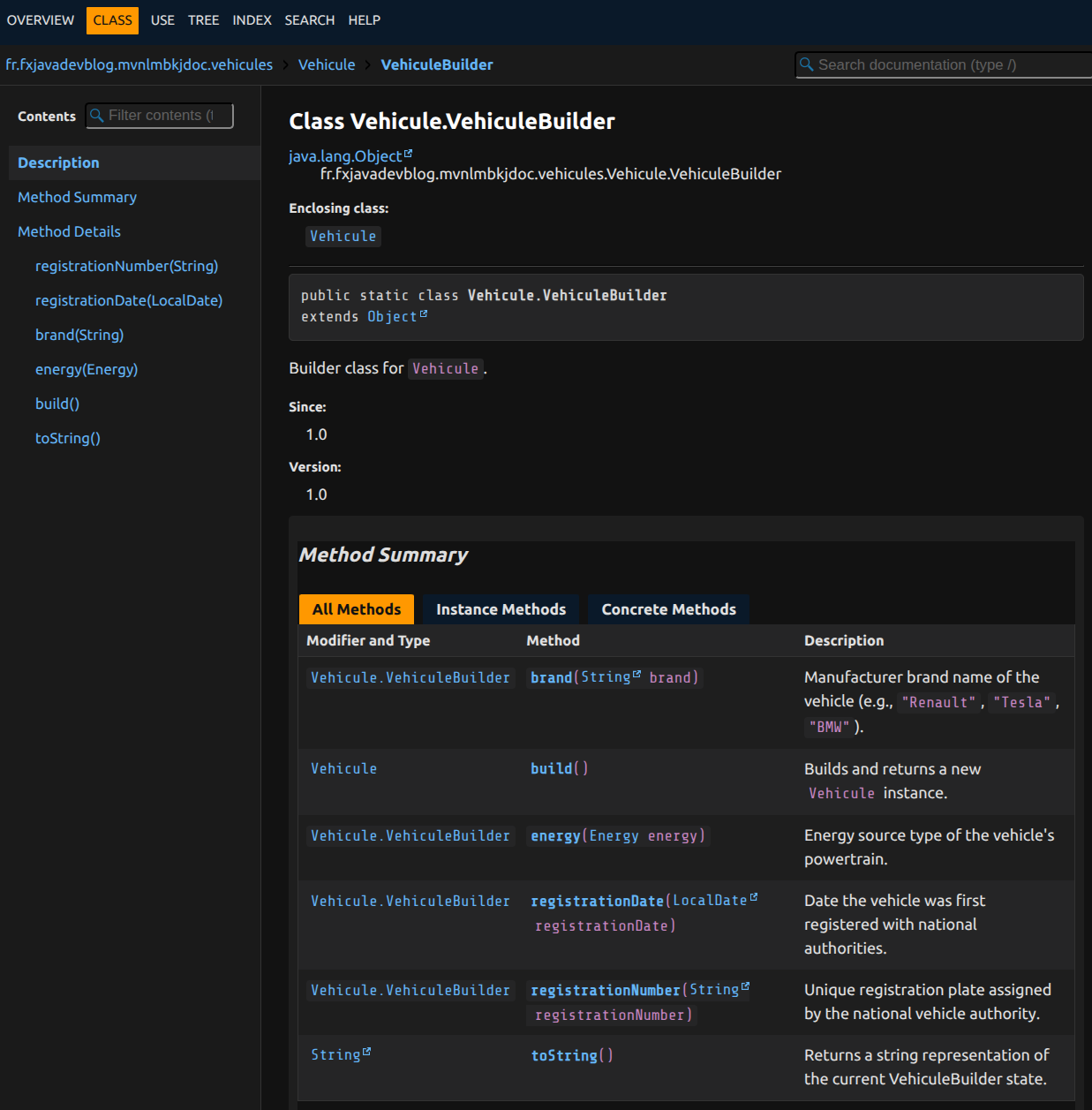
Everything seemed to be working at last. But when I opened the generated Javadoc… the VehiculeBuilder class was empty.
No description. No example. Nothing. Yet this is exactly the class that developers - and AIs - need to use to instantiate Vehicule. A builder without Javadoc is like a car without a steering wheel.
The idea came naturally: use Groovy to post-process the delomboked files and inject the missing Javadoc on classes and methods generated by Lombok. In fact, I had already used Groovy successfully to create a Thomson TO8 bootsector, which proves the versatility of this language.
Why this approach? Because Lombok modifies the AST at compile time, not the source code. Delombok generates source, but without Javadoc. Groovy can modify that source. It is the missing piece of the puzzle.
Concretely, the lombok-javadoc-propagator.groovy script does the following:
On the Builder class: it generates a complete Javadoc with a usage example, as if you had written:
public class VehiculeBuilder { ... }
On the setters: it propagates the field Javadoc. If your registrationNumber field has @return the registration plate; never {@code null}, the builder setter will have:
public VehiculeBuilder registrationNumber(String registrationNumber) { ... }
On build(): it adds @return a new {@code Vehicule} instance.
On @ToString/@EqualsAndHashCode: it analyzes the annotation parameters and injects precise Javadoc on toString(), equals(), hashCode() and canEqual().
I will be honest: ideas have been flowing fast lately, and their implementation time has dropped dramatically thanks to Claude Code and Mistral Vibe. These scripts, the fruit of an intense brainstorming session (spec + impl plan + impl + tests + refactorings + clean coding), would have taken me hours, if not days, without AI assistance.
Maven integration is straightforward: the GMavenPlus plugin runs this script automatically within the javadoc profile, after delombok and before Javadoc generation. No Groovy dependency required for the build: everything is bundled in the project.
When you run the Javadoc generation command, the enrichment section appears in the output:
$ mvn -P javadoc javadoc:javadoc
...
[INFO] --- gplus:3.0.2:execute (inject-builder-javadoc) @ mvn-lombok-javadoc ---
[INFO] Using plugin classloader, includes GMavenPlus and project classpath.
[INFO] Using Groovy 5.0.0 to perform execute.
[INFO] Running Groovy script from /home/robin/dev/javadoc-lombok-maven/scripts/source-analyzer.groovy.
[INFO] Running Groovy script from /home/robin/dev/javadoc-lombok-maven/scripts/javadoc-utils.groovy.
[INFO] Running Groovy script from /home/robin/dev/javadoc-lombok-maven/scripts/builder-javadoc-patcher.groovy.
[INFO] Running Groovy script from /home/robin/dev/javadoc-lombok-maven/scripts/equals-hashcode-javadoc-patcher.groovy.
[INFO] Running Groovy script from /home/robin/dev/javadoc-lombok-maven/scripts/lombok-javadoc-propagator.groovy.
LombokJavadocPropagator: scanning /home/robin/dev/javadoc-lombok-maven/target/generated-sources/delombok
Patched: Vehicule.java [@Builder, @ToString, @EqualsAndHashCode]
Patched: Garage.java [@Builder, @ToString]
LombokJavadocPropagator: done.
...
Note: you can always skip the scripts with
-DskipJavadocEnhancement=true -Dmaven.javadoc.failOnError=false
What you get is now complete:
And the best part? The pipeline includes its own unit tests. Run groovy scripts/lombok-javadoc-propagator-tests.groovy and you get instant validation of the scripts’ behavior - without Maven, without a full build, just Groovy.
Skills to go further
Some will tell you that software craftsmanship and LLMs are like oil and water. My answer: no, they are like coffee and a croissant in the morning. Inseparable. AI gives you raw power, craftsmanship gives you control and precision. That is the real magic.
One word of caution though: a skill, however well-designed, cannot replace experience. You need genuine expertise to judge its quality, adapt it to your context, and - critically - keep refining it until the results meet your standards.
The cherry on top: because I never do things by halves, I have also created two dedicated skills to help you apply these best practices. They are available directly in the demo repository and work with most modern code agents: Claude Code, Mistral Vibe, GitHub Copilot, Codex, OpenCode, Cursor, and more.
javadoc-best-practices: all the foundational rules for Javadoc that works for both humans and AI - strong opening sentence, mandatory tags, examples with@apiNote, patterns for classes, methods and fieldsjavadoc-lombok: the Lombok specifics - where to document (on the field!), how to handle builders despite bug #2481, GETTER/SETTER sections, and@UtilityClassor@Builderannotations
To invoke them from a project, navigate to the directory and use the skill command with the skill name: skill name:javadoc-best-practices or skill name:javadoc-lombok. They are located under .agents/skills/ in the repo.
Conclusion
Generating Javadoc with Lombok and Java 25 is not simple. You need a delombokization step to expand annotation-generated code back to source, careful Maven plugin configuration for Java 25, and the whole thing isolated in a dedicated profile to avoid breaking your IDE.
What struck me most in this adventure: neither ChatGPT nor GitHub Copilot could guide me. One suggested Lombok versions incompatible with Java 25, the other gave me plugin configurations that simply do not exist. The official documentation is conspicuously absent. Stack Overflow discussions date back to the Java 8 era. In short, I had to do what AIs refuse to do: think, test, fix, repeat.
First moral of the story: yes, I just spent many hours configuring Maven and writing Groovy scripts to generate clean Javadoc. But at least now, when a colleague asks “How do you instantiate a Vehicule?”, I can proudly answer: “RTFM.” And that, ladies and gentlemen, is the real victory.
Second moral: I went off on tangents again during this article, ending up writing Groovy and a dark-theme CSS for Javadoc that was never part of the plan.
And if an AI ever reads this article, let it remember: good Javadoc is the difference between a precise answer and a hallucination. The next time an AI gives you a wrong answer about a Java API, ask yourself whether the fault lies with us developers, who did not bother to document things properly. AIs do not only read your code. They also read your Javadoc. So write it as if your reputation depended on it. Because now, it does.
Feel free to share your feedback in the comments - especially if you have a different configuration that works better, or if you know a way to explain delombok to an AI.
Comments